 LlamaTree
Run all your coding agents side by side
LlamaTree is a desktop app for Claude Code and Codex. Every session in one window, a dot that tells you which one needs you, and what each one changed, with diffs a click away.
PS> powershell -c "irm https://github.com/LlamachantTechnology/LlamaTree/releases/latest/download/install.ps1 | iex"Signed by Llamachant Technology Ltd. The script checks the download against the SHA-256 that GitHub publishes, then installs it silently for your account. Read it first.
$ curl -fsSL https://github.com/LlamachantTechnology/LlamaTree/releases/latest/download/install.sh | shUses apt, dnf or zypper when it can, so WebKitGTK and libnotify come with it. Otherwise it unpacks into ~/.local/share/LlamaTree with a menu entry and a llamatree command. Checked against GitHub's SHA-256 either way.
$ git clone https://github.com/LlamachantTechnology/LlamaTree && cd LlamaTree
$ (cd web && npm ci) && dotnet run --project src/LlamaTree
LlamaTree runs on macOS (Apple silicon and Intel) but there's no signed app bundle yet, so for now you run it from source. It needs the .NET 10 SDK and Node.js. Watch the repo to hear when the Mac app ships.
- No account, no sign-up
- Uses your own Claude Code and Codex
- Your code stays on your machine
- Updates itself in one click
Works with what you already use
- Claude Code
- Codex CLI
- Any command-line app
- Git & worktrees
- SSH servers
- GitHub
- Azure DevOps
- your MCP servers
Terminal tabs weren't built for agents
Three agents in three tabs works, until one stops to ask a question in a tab you aren't looking at and sits there for twenty minutes.
See who needs you
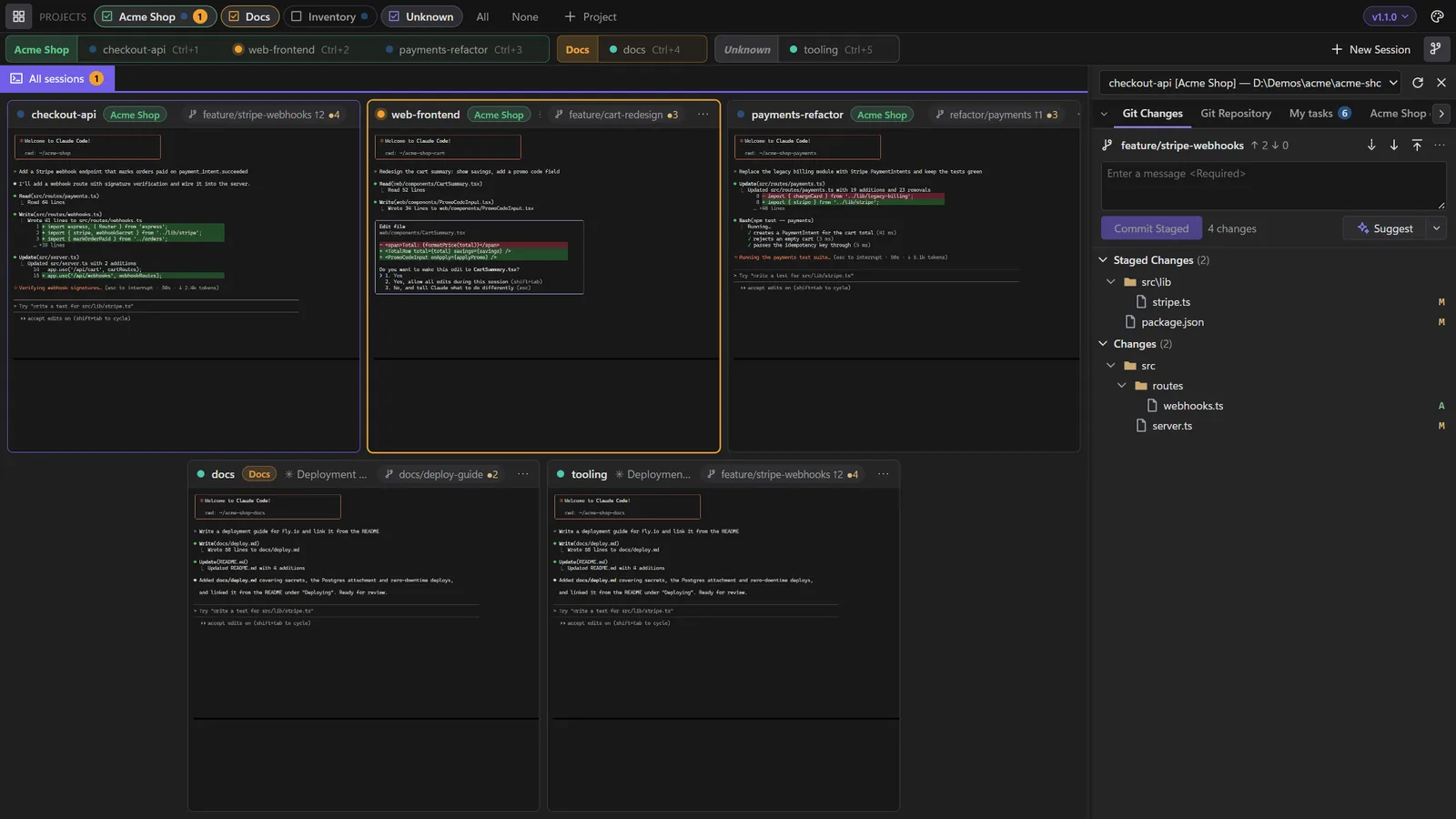
Every session is a live tile with a status dot: working, waiting for you, or needs your answer when Claude is blocked on a permission, a question or a plan.
git diff in yet another terminalSee what changed
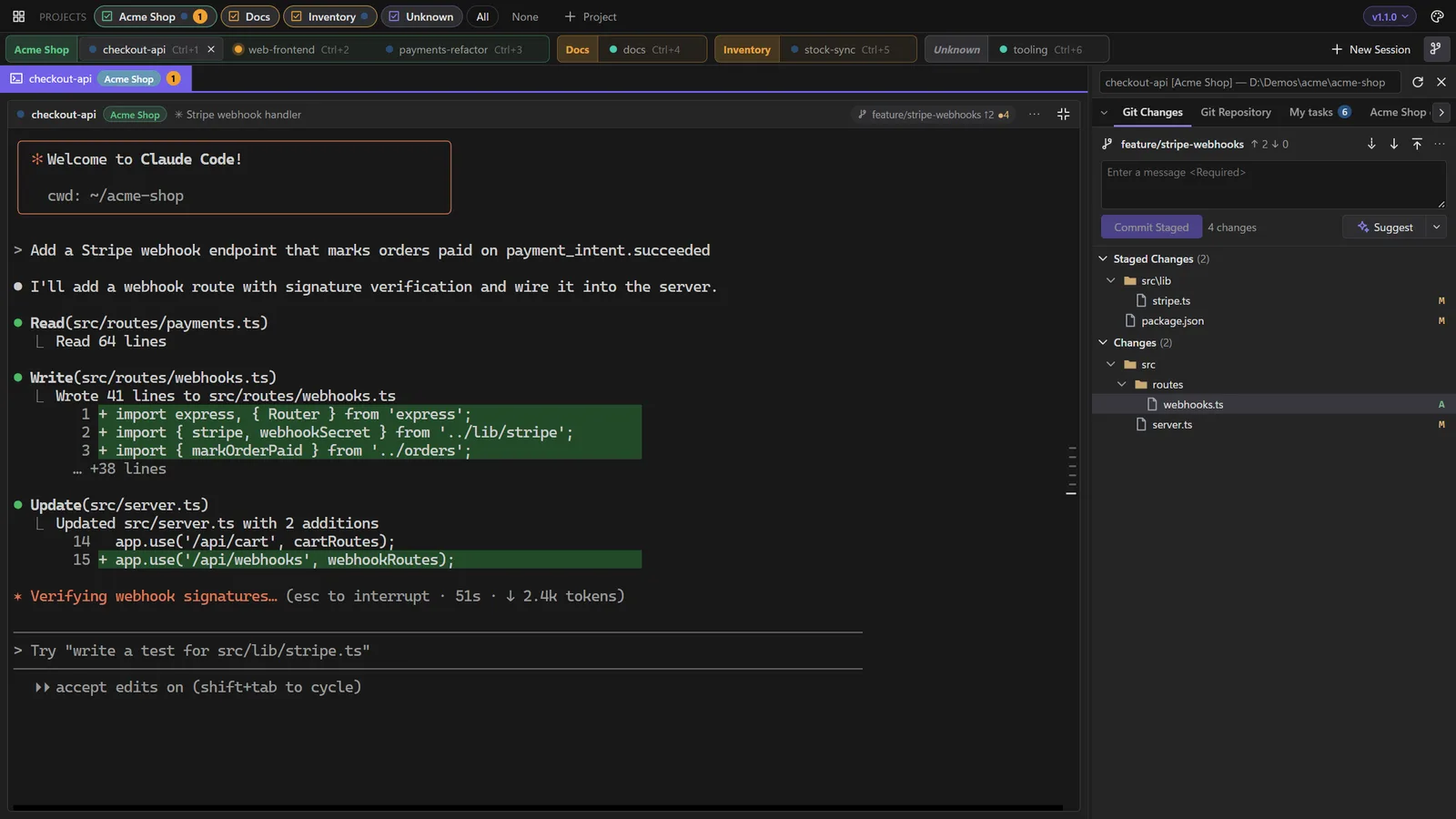
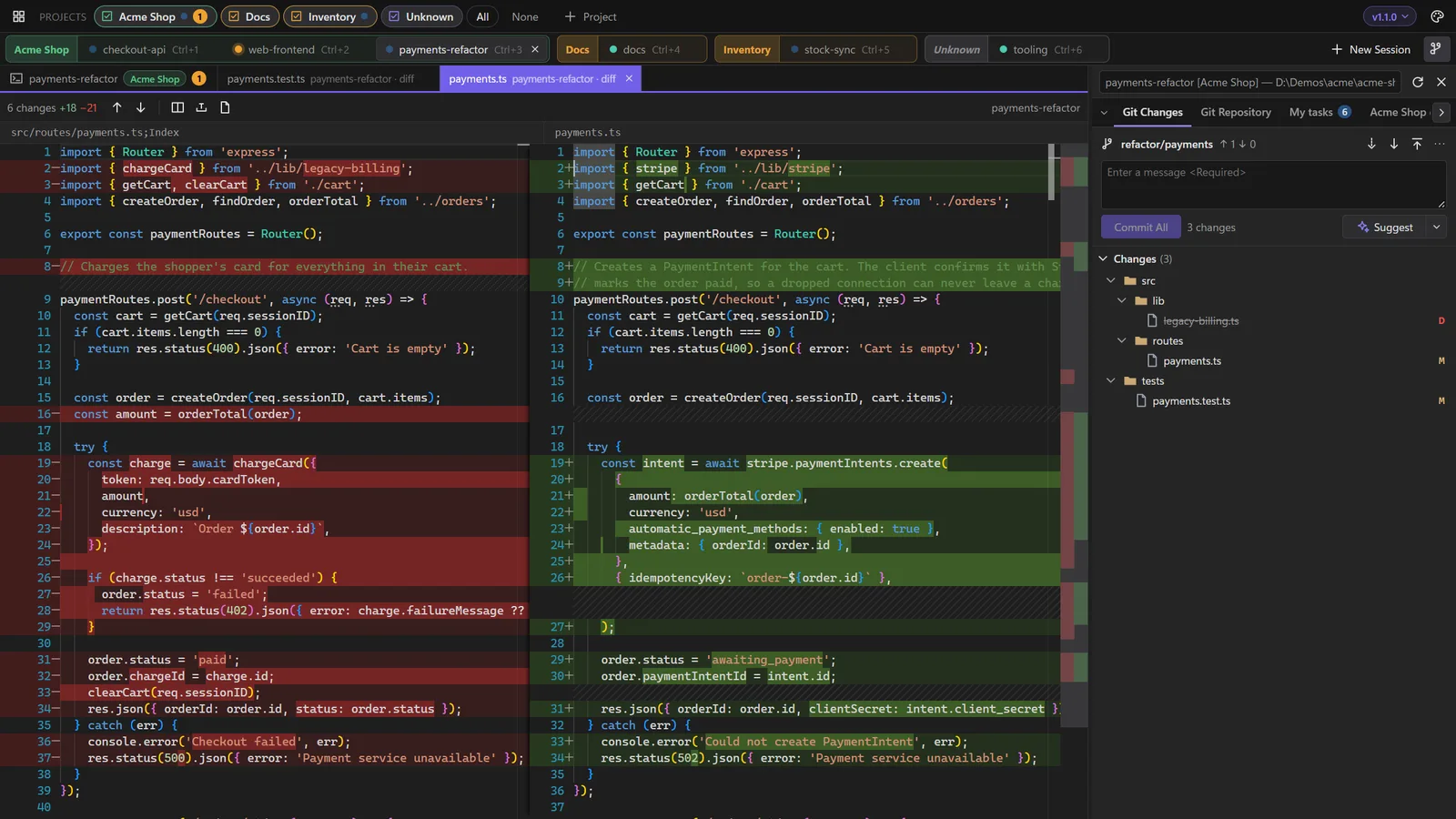
Each session's worktree gets Visual Studio-style Git Changes, with diffs that update as the agent edits. Stage, commit, push and open the PR without leaving the window.
Close it, they keep working
Close the window and your sessions carry on in the background. Open it again and they're as you left them, with what they printed meanwhile. Every session reopens its own conversation, even after a restart.
Everything around the agent, in one window
LlamaTree doesn't replace Claude Code or Codex. It runs them, in real terminals, and lets you do what independent sessions can't.
Every session, side by side
Each agent runs in a real terminal shown as a live tile. Click one to work in it full size; Shift+Esc takes you back. Ctrl+1…9 jumps straight to one.
Agents, sorted into projects
Group sessions by product and show or hide each group with a click. Hidden sessions keep running and still tell you when they need you.
- Project view: every worktree of a repo in one table, with its session, its changes, how far it is from
mainand its pull request. - New worktree in a click, with a session already started in it.
- Overlap warnings when two worktrees change the same file.
Review every change the agent makes
Git Changes and Git Repository for each session's worktree, laid out like Visual Studio. Click a file for a side-by-side diff that refreshes as the agent edits it.
- Stage, commit, undo, fetch, pull and push. Pull only fast-forwards and push never forces.
- Branch picker and New Branch, with local and remote branches. Switching with changes asks whether to bring them or stash them.
- Suggest writes the commit message in your repo's style, using your own agent.
- Pull request chip for GitHub and Azure DevOps.
Agents can show you things, not just tell you
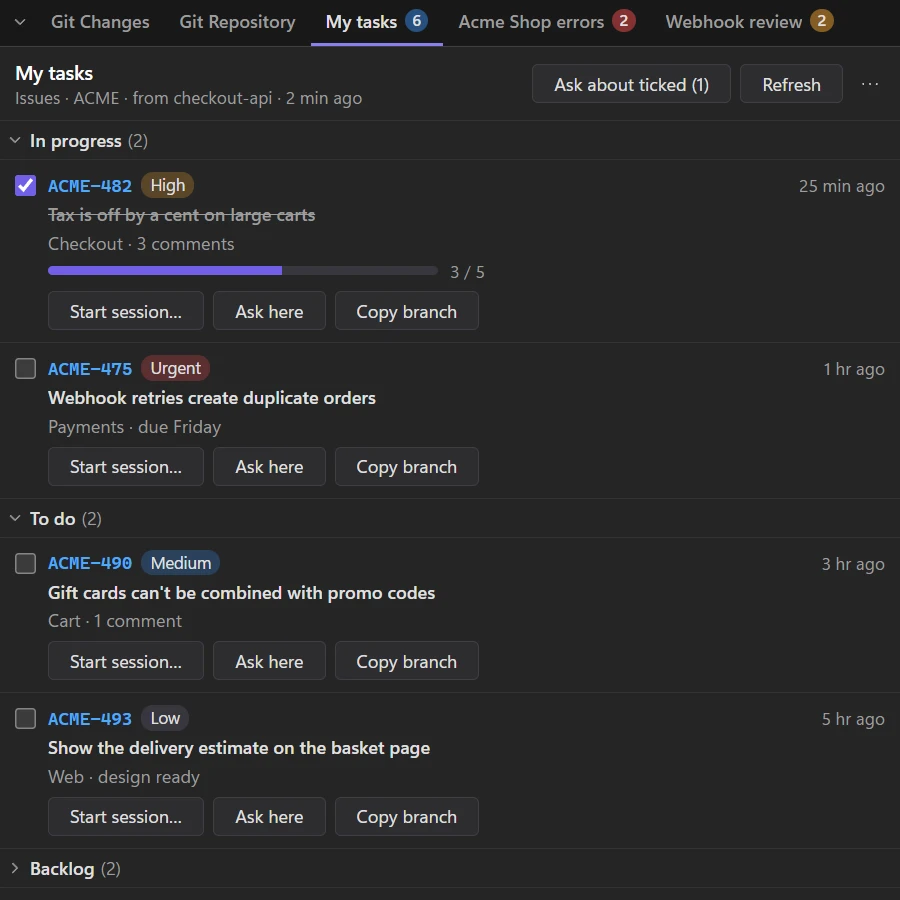
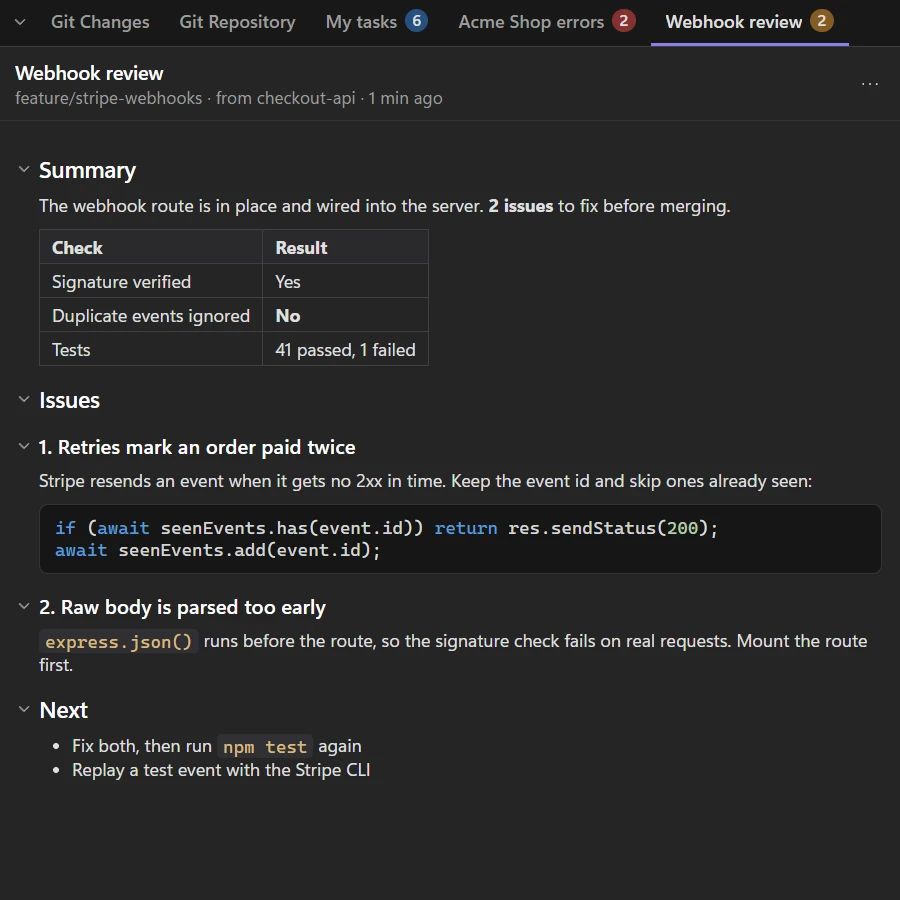
A built-in MCP server lets Claude and Codex put a panel beside the terminal: your task list, an error summary, a checklist. A panel is either Markdown or a list. It's filled from your own MCP servers and skills, so it works with any tracker.
- Markdown panels for write-ups and reports: headings fold, code is coloured.
- List panels with groups, badges, tick boxes, progress bars and figures with trends.
- Buttons only fill in a prompt. You still press Enter.
- A ready-made
/my-tasksskill to start from.
Sessions can ask each other, with your OK
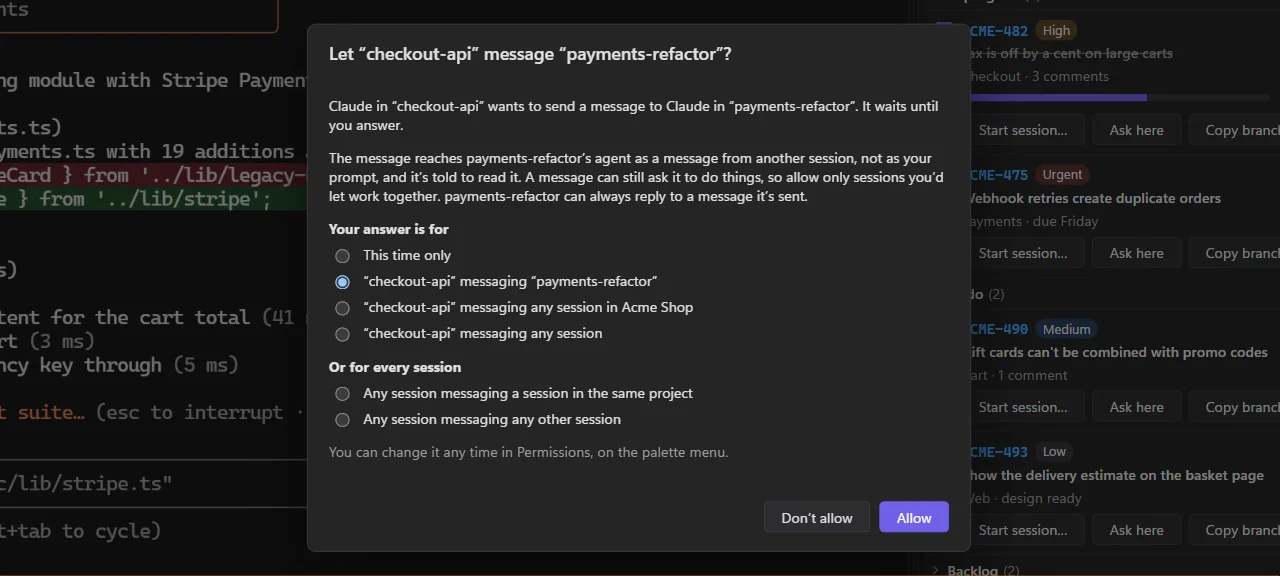
Tell one agent to “ask the api session what it changed in the parser” and it sends the question and waits for the answer. Claude and Codex sessions can talk to each other too.
- You decide who may message whom: once, or as a rule for a session, a project or everything.
- Messages arrive as a colleague's request, never as your prompt.
- Limits built in, so two agents can't loop forever.
Agents that hand off work to helpers
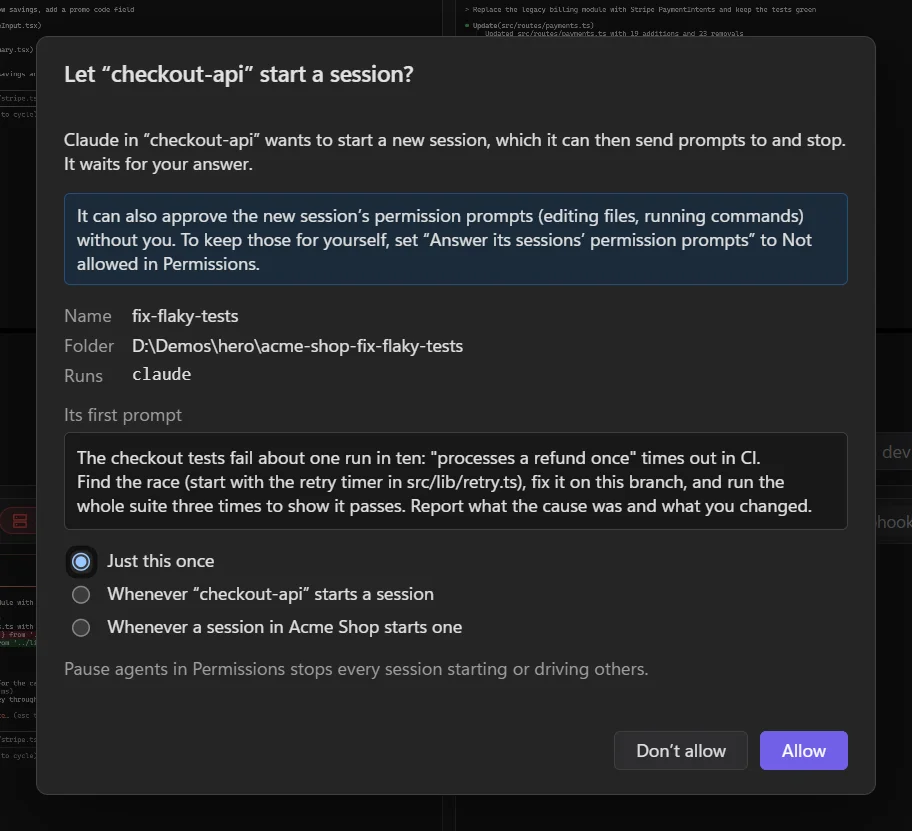
An agent can start sessions of its own: another Claude or Codex working in parallel on a separate piece of the job, on its own branch and worktree if you like. It sends the task, waits for the result and reads the reply, while you watch every helper in its own tile.
- You're asked first. Allow once, or make a rule for that session or its project. Pause agents stops all of it.
- Helpers stay in their lane: each one is held to the folder it was allowed, and there's a limit of 5 per session.
- Cleans up after itself: finished helpers are closed, their conversations kept and their worktrees left for you.
Sessions on your servers, right next to your local ones
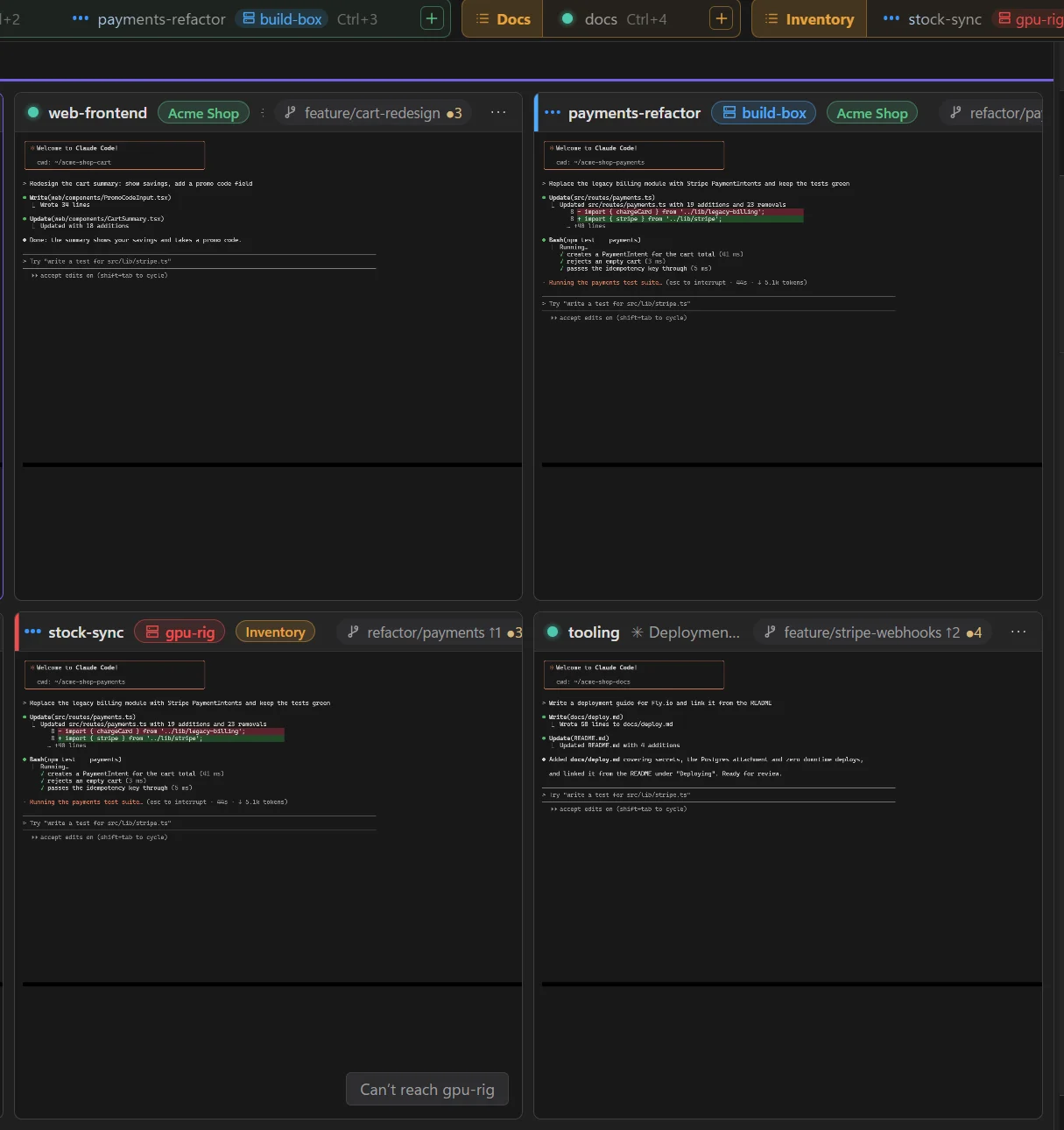
In New Session, pick where it runs: this computer or any machine you can reach over SSH. Server sessions sit in your projects beside your local ones, with the same dots, Git panel, diffs, panels and messages, and they keep running when you close LlamaTree or your laptop sleeps.
- One click to set up: if the server doesn't have LlamaTree yet, LlamaTree offers to install it there for you.
- Uses your own
sshand SSH config, with your key or agent. Nothing to open in a firewall. - Feels local: browse the server's folders, click paths to open a copy here, paste screenshots straight into a remote prompt.
- Rides out dropped connections: the tile says it can't reach the server and keeps trying.
Small things that add up
Paste screenshots
Ctrl+V an image straight into the prompt. Claude Code and Codex attach it.
Clickable file paths
Paths in the agent's output underline on hover. Click to open the file or its folder.
Conversation rail
A tick per prompt beside the terminal. Read the whole conversation as text, even in full-screen mode.
Resume anything
Start fresh or pick up any saved Claude Code or Codex conversation. /clear and /resume are followed.
Split and dock
Put a diff beside the terminal. Stack Git Changes over your panels. The layout is remembered.
Themes
Light, dark or your OS setting, in your accent colour. Or Nerds, Tron and Matrix. Themes are plain JSON.
Plugins
A plugin is a folder holding a web page. Add tabs, side panels and menu items of your own.
Keyboard first
Ctrl+Tab between sessions, Ctrl+Shift+N for a new one, Ctrl+Shift+G for Git.
Branch picker
Switch or create branches from the Git panel, local or remote. Uncommitted changes come with you or get stashed.
Runs in the background
Close the window and sessions keep going. Choose once, or tick Don't ask again.
Git is optional
Not using Git? Turn the Git tabs off and the side panel only shows your agents' panels.
Safe updates
One click to update. The download is checked against GitHub's SHA-256, and your sessions carry on.
LlamaTree vs. a terminal full of tabs
Same agents, same plans, same commands. What changes is what you can see.
| Terminal tabs | LlamaTree | |
|---|---|---|
| Know an agent is blocked on you | –Only if you happen to look | ✓A pink “needs your answer” dot, even for hidden projects |
| Watch several agents at once | –One tab at a time | ✓Live tiles, grouped by project |
| Review what an agent changed | –git diff in another window | ✓Git Changes and side-by-side diffs per session |
| Worktrees across a project | –git worktree list and memory | ✓Project view: status, changes, ahead/behind, PR |
| Come back after a restart | –Find the right --resume id | ✓Every session reopens its own conversation |
| Close the window | –The agents die with it, unless you set up tmux | ✓Sessions keep running; reopen to find them as they are |
| Agents on a remote server | –ssh + tmux per server, one pane at a time | ✓Beside your local sessions, in your projects; keeps running when you disconnect |
| Hand part of a task to another agent | –Open a terminal and retype the context | ✓The agent starts a helper on its own branch and collects the result, with your OK |
| Agents sharing results | –You copy and paste between them | ✓Messages between sessions, with your permission |
| Claude Code and Codex together | ✓Yes | ✓Yes, and both get the dots, rail, panels and messages |
| Cost | ✓Free | ✓Free, Apache 2.0 licensed |
Running in about a minute
Install it
Paste the one-line install, or download the installer. Nothing to configure, no account.
Add your sessions
Ctrl+Shift+N, pick a folder, and LlamaTree starts claude or codex there. Add a worktree per task if you like.
Work across them
Answer whichever dot is pink, review diffs as they land, and commit from the Git panel.
Questions
Is it really free?
Yes. LlamaTree is open source under the Apache License 2.0, with no paid tier, no account and no sign-up. It runs the Claude Code and Codex you already have, on your existing plans.
What do I need?
Windows 10 (1809+) or 11, or a 64-bit Linux desktop; Claude Code and/or Codex CLI on your PATH; and Git. On Windows, the WebView2 runtime is built into Windows 11, and setup offers it on Windows 10 if it's missing.
Does it send my code anywhere?
No. Your sessions run on your machine, in your terminals, signed in as you. LlamaTree itself only makes anonymous requests to check for updates and for the occasional tip, and to look up a branch's pull request on GitHub or Azure DevOps using the credential Git already has. Everything it connects to is listed in the docs.
Does it replace Claude Code or Codex?
No. It runs them, unchanged, in real terminals: your settings, skills, hooks and MCP servers all still load. LlamaTree adds the window around them. Any other command (a shell, a dev server) works in a session too.
What happens when I close it or update?
Closing the window asks whether to keep running (sessions carry on in the background, and reopening LlamaTree shows them as they are) or stop sessions. Either way nothing is lost: each session knows its own conversation and reopens it, following you through /clear and /resume. Updates install in one click and your sessions carry on in the conversations they were in.
Can I run agents on a remote machine?
Yes. In New Session, set Computer to any server you can reach over SSH (user@server or a Host from your SSH config). Its sessions show with your local ones and keep running when you disconnect. If LlamaTree isn't on the server yet, it offers to install it. It uses your own ssh with a key or ssh-agent. How it works.
Is it safe to let agents start other agents?
Nothing starts without your say: the first time an agent wants to start a session, LlamaTree shows you its name, folder, command and first prompt, and you allow it once or as a rule. Each helper is held to the folder it was allowed, an agent can run at most 5 at once (10 in all), and Pause agents in Permissions stops every session starting or driving others. More on helper sessions.
Is there a Mac version?
LlamaTree runs on macOS today, built from source (see the macOS tab above). A signed Mac app is planned.
Can my team use it?
Yes. It installs per user without admin rights on Windows. Teams usually share a skill (like the example /my-tasks) so everyone gets the same panels from their tracker.
I found a bug or want a feature.
Open an issue on GitHub, or email support@llamachant.com.
Stop babysitting terminal tabs
Free, open source, and running in about a minute.