 LlamaTree
Getting started
LlamaTree is a desktop app that runs your Claude Code and Codex sessions side by side, shows which one needs you, and gives each one a Git panel. This page gets you from nothing to three sessions in a few minutes.
What you need
- Windows 10 (1809 or later) or Windows 11, x64; or a 64-bit Linux desktop (x86-64).
- Claude Code and/or the Codex CLI, installed and signed in, on your
PATH. Check by runningclaudeorcodexin a terminal. - Git.
LlamaTree uses your own Claude Code and Codex, with your own plans. There's no LlamaTree account.
Install
Windows
Run this in PowerShell:
powershell -c "irm https://github.com/LlamachantTechnology/LlamaTree/releases/latest/download/install.ps1 | iex"
It downloads the latest installer, checks it against the SHA-256 GitHub publishes for it, and installs it silently for your account. No administrator rights are needed. The script is in tools/install if you'd like to read it first.
Or download LlamaTree-Setup-<version>.exe from the latest release and run it. Releases are signed by Llamachant Technology Ltd. If SmartScreen still warns about a new release, check that the publisher is Llamachant Technology Ltd, then choose More info › Run anyway.
LlamaTree needs the WebView2 runtime. It's built into Windows 11, and setup offers to download it on Windows 10 if it's missing.
Linux
curl -fsSL https://github.com/LlamachantTechnology/LlamaTree/releases/latest/download/install.sh | sh
When there's apt, dnf or zypper and you can use sudo, it installs the .deb or .rpm, so WebKitGTK and libnotify come with it. Otherwise it unpacks the .tar.gz into ~/.local/share/LlamaTree, with a llamatree command in ~/.local/bin and a menu entry, for your account only. To choose that anyway, run curl … | LLAMATREE_INSTALL=tar sh.
To install by hand, download the package for your distribution from the latest release:
| Distribution | Package | Install |
|---|---|---|
| Ubuntu, Debian, Mint, Pop!_OS… | llamatree_<version>_amd64.deb | sudo apt install ./llamatree_<version>_amd64.deb |
| Fedora, openSUSE, RHEL… | llamatree-<version>-1.x86_64.rpm | sudo dnf install ./llamatree-<version>-1.x86_64.rpm |
| Anything else | LlamaTree-<version>-linux-x64.tar.gz | Install WebKitGTK 4.1 and libnotify, unpack it anywhere and run LlamaTree |
Then start LlamaTree from your applications menu, or run llamatree.
macOS
LlamaTree runs on macOS, but there's no signed app bundle yet, so for now you run it from source. You need the .NET 10 SDK and Node.js.
git clone https://github.com/LlamachantTechnology/LlamaTree && cd LlamaTree
(cd web && npm ci) && dotnet run --project src/LlamaTree
On a Mac, ⌘ does what Ctrl does on Windows. A copy built from source doesn't update itself: Check for updates tells you when a new version is out.
Your first sessions
- Press Ctrl+Shift+N, or click New Session.
- Pick where it runs (Computer: this one, or a server) and the folder of a project. The command is
claudeby default; change it tocodexfor Codex, or to anything else (a shell, a dev server). - Choose New conversation, or resume one of your saved conversations.
- Optionally, put the session in a project so it's grouped with related sessions.
Add two or three more. To give each task its own branch, use the + at the end of a project's tabs › In a new worktree…: LlamaTree creates the worktree on a new branch and starts a session in it.
Tip: try one session per worktree. Each agent works on its own branch, the Git panel shows exactly what each one changed, and the Project view lines them all up.
Finding your way around
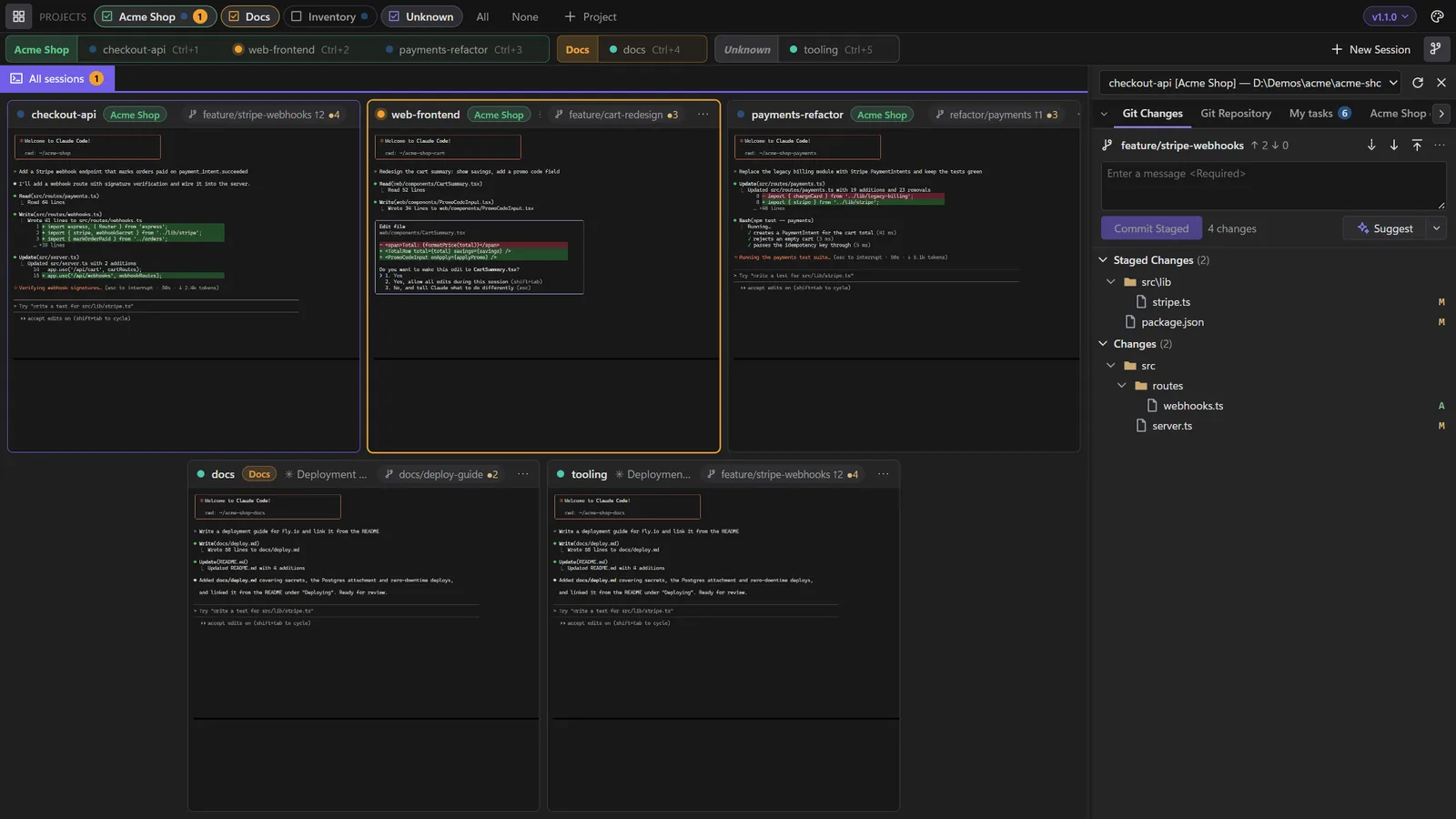
- Projects row (top): tick projects on and off. Hidden sessions keep running.
- Session tabs: one per session, grouped by project. Click one, or press Ctrl+1…9, to open it full size. Click it again, or press Shift+Esc, to go back to the tiles.
- Tiles: every visible session, live. The dot by each name is its status: blue while working, pink when it needs your answer, orange when it finished while you weren't watching, green when idle.
- Side panel (right): Git Changes and Git Repository for the selected session, plus any panels its agent shows you. Ctrl+Shift+G toggles it.
- Palette button (top right): theme, accent colour, status dot style, plugins and permissions.
- Version chip (top right): check for updates and choose what closing the window does. When an update is out, an Update button appears in the title bar.
Plain Esc always goes to the terminal, because Claude Code uses it to interrupt.
Next
- Sessions and projects: status dots, conversations and the Project view.
- Git and diffs: reviewing and committing what your agents changed.
- Panels and messages: letting agents show you things and talk to each other.
- Helper sessions: agents that hand work to agents of their own.
- Sessions on a server: agents on another machine, over SSH, beside your local ones.
- Keyboard shortcuts.