 LlamaTree
How to tell when Claude Code is waiting for you
Claude Code stops and waits whenever it needs a permission, asks a question or finishes its work, and in a terminal tab you aren't looking at, nothing tells you. There are two ways to fix that: have Claude Code notify you itself, with a setting or a hook, or run your sessions somewhere that shows each one's state. This page covers both.
The problem
One agent in one terminal is easy: you're watching it. With several, in tabs, the one that matters is always the one you aren't looking at. An agent that asked "Make this edit?" two minutes into a twenty-minute task has done nothing for the other eighteen.
There are two different moments worth knowing about:
- It needs an answer: a permission, a question, a plan to approve. It can't carry on without you.
- It has finished: nothing is blocked, but its work is ready for you to look at.
By hand: have Claude Code notify you
Claude Code can run a command of yours when it wants your attention, through its hooks. A Notification hook runs when Claude Code is waiting on you, and a Stop hook runs when it finishes answering. In ~/.claude/settings.json:
{
  "hooks": {
    "Notification": [
      { "hooks": [{ "type": "command", "command": "notify-send 'Claude Code' 'Waiting for you'" }] }
    ]
  }
}
notify-send shows a desktop notification on Linux. On Windows, use a command that makes a sound or shows a notification instead, for example:
{ "type": "command", "command": "powershell -c \"[console]::beep(880, 300)\"" }Claude Code's own hooks reference has the events and their options for your version; they change from time to time.
This works, with some limits:
- A notification doesn't say which session, unless your command works it out, and it's gone once dismissed. With five sessions you still go looking.
- It's set up per agent. Codex and other agents each have their own way, or none.
- It doesn't tell the two moments apart unless you write a hook for each.
With LlamaTree: a dot on every session
LlamaTree is a free, open-source desktop app for Windows and Linux that runs your agents side by side in one window. Every session's tab and tile carries a status dot, so the answer to "which one needs me?" is on screen all the time:
| Dot | Means |
|---|---|
| Working (blue) | The agent is busy. |
| Needs your answer (pink) | It's asking for a permission, a question, a plan to approve or whether to trust the folder, and can't carry on until you answer. |
| Waiting for you (orange) | It finished while you weren't watching it. |
| Idle (green) | Done, and you've seen it. |
| Not running (grey ring) | The process has stopped. |
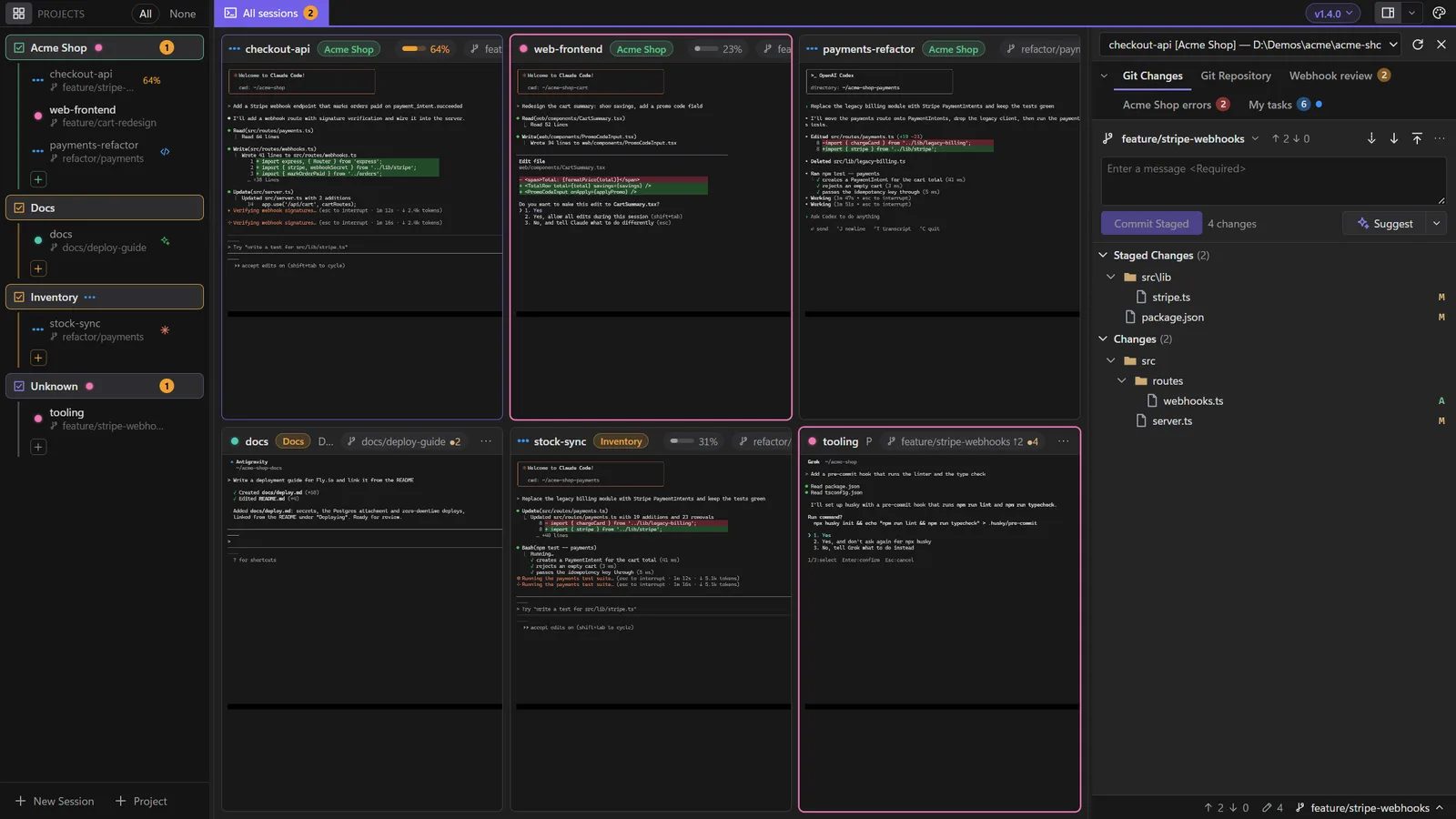
- It tells the two moments apart: pink is blocked on you, orange is finished.
- Nothing to set up. There are no hooks to write; the dots work for Claude Code, Codex, Antigravity and Grok as soon as a session starts.
- Hidden sessions still count. Hide a project and its tab shows how many of its sessions are waiting for you.
- Each state has its own shape and motion as well as its colour, and you can pick from four styles.
Your own hooks still run: LlamaTree starts the agents unchanged, with your settings.
Other programs
Any command can run in a LlamaTree session, and any program can turn its dot pink by writing an OSC 7501 sequence with state=blocked to the terminal, which is how Codex reports that it's waiting. AI agents has the details.
Related
- Status dots: every state and the four styles.
- How to run several Claude Code sessions in parallel: a worktree per task.
- The pink dot doesn't show: if a session isn't reporting.
Updated 21 November 2026, for LlamaTree v1.4.0. Something wrong or missing? Tell us on GitHub.