 LlamaTree
How to run several Claude Code sessions in parallel
To run several Claude Code sessions at once on the same repository, give each one its own Git worktree: a second folder for the same repository, on its own branch. Each agent then edits its own files, and nothing one does lands in another's work. The same goes for Codex and any other command-line agent, and it works the same way on Windows and Linux.
This page shows how to do that by hand, then how LlamaTree does it for you.
Why not just open more terminals in the same folder?
You can, and for agents that only read (answering questions, reviewing code) it's fine. Once two agents edit the same folder, though:
- they overwrite each other's edits to the same file;
- one runs the tests or the build while the other's change is half made;
git diffshows everybody's changes mixed together, so you can't review or commit one task on its own.
A worktree per task removes all three.
By hand: one worktree per task
From your repository's folder, make a worktree on a new branch for each task:
git worktree add ../shop-fix-login -b fix-login
git worktree add ../shop-new-report -b new-report
Each command makes a folder beside your repository, checked out on its own branch. They share one .git, so there's nothing to clone and branches are visible everywhere.
Then open a terminal in each folder and start an agent there:
cd ../shop-fix-login
claude
Use codex in place of claude for Codex. (Claude Code can also make the worktree itself: claude --worktree fix-login.) To pick a conversation up again later, run claude --resume (or codex resume) in the same folder and choose it from the list.
When a task is merged, remove its worktree:
git worktree list
git worktree remove ../shop-fix-login
A few things to know:
- A new worktree has only what Git tracks. Files Git ignores (
.env,node_modules, build output) aren't there, so install dependencies and copy local settings in each one. - One branch, one worktree. Git won't check the same branch out in two worktrees.
- Each session uses your plan. Three agents working at once use your limits about three times as fast.
What gets hard as the number grows
Two sessions in two terminal tabs is manageable. With four or five, the work becomes keeping track:
- Which one is waiting for you? An agent that stops to ask for a permission sits there until you happen to look at its tab. (How to tell when Claude Code is waiting covers this on its own.)
- What did each one change? That's
git statusandgit diffin each folder, one at a time. - Which worktree is which?
git worktree list, and remembering which is merged, which is behindmainand which has a pull request. - Closing the terminal ends the agent, unless you run it under tmux, which on Windows usually means WSL.
With LlamaTree
LlamaTree is a free, open-source desktop app for Windows and Linux that runs these same agents, in real terminals, in one window. It does the steps above and shows you the things that are hard to keep track of.
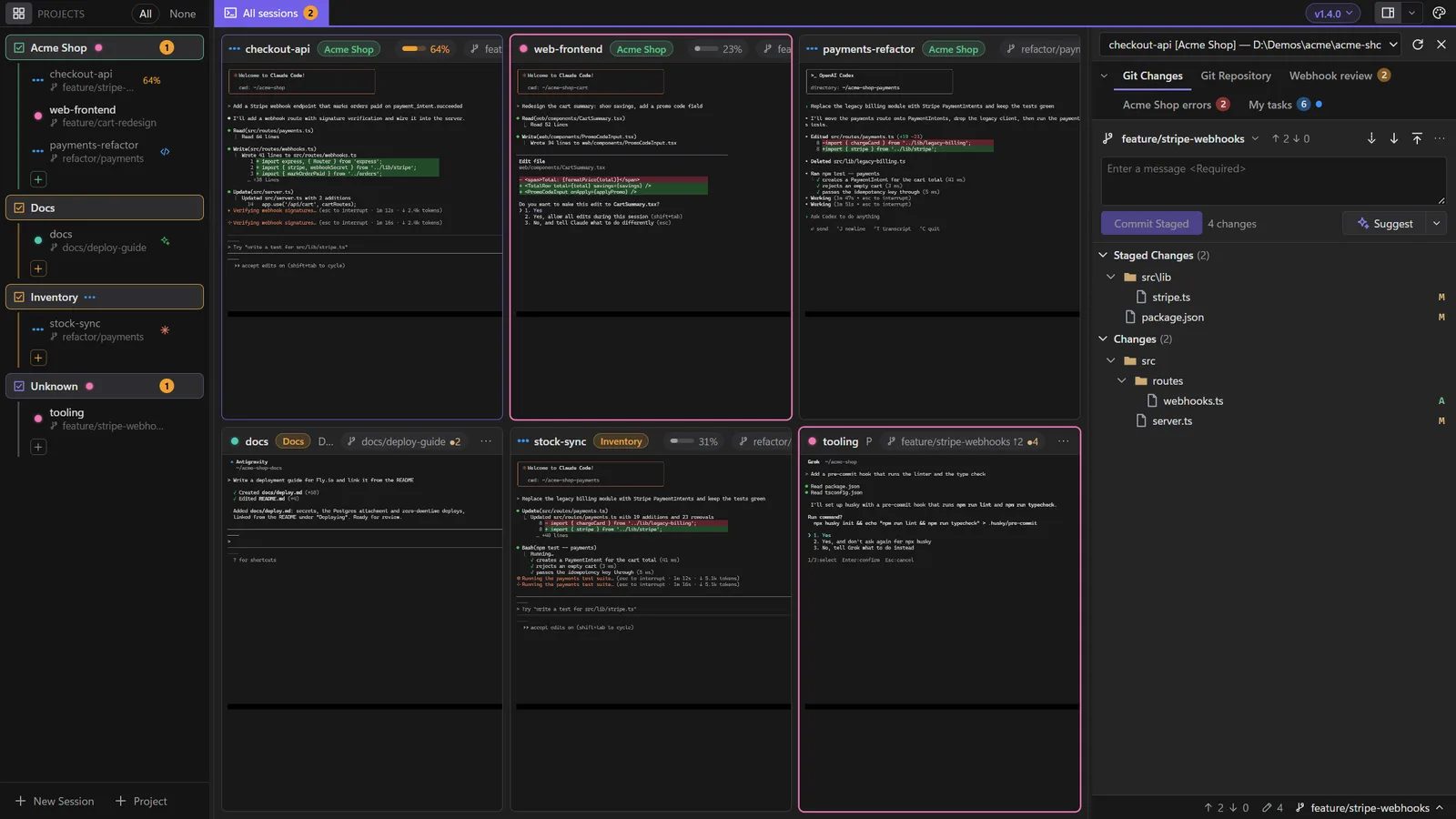
- Install it with the one line on the home page, and start a session: Ctrl+Shift+N, pick your repository's folder, and leave the command as
claudeor change it tocodex. - Add a worktree per task: the + at the end of the project's tabs › In a new worktree… creates the worktree on a new branch and starts a session in it.
- Watch the dots. Every session is a live tile with a status dot: blue while it works, pink when it needs your answer, orange when it finished while you weren't watching.
- Review each one's changes. Select a session and the Git panel shows that worktree's changes, with side-by-side diffs that refresh as the agent edits. Stage, commit and push from there.
- Work in several at once. Ctrl+click up to four sessions to put them side by side at full size. They stay together as a view you can come back to.
The Project view lines up every worktree of the repository in one table: its session and what it's doing, how many files it changed, how far it is ahead of and behind the base branch, and its pull request. It warns when two worktrees change the same file, and removes a worktree when you're done with it (never one with uncommitted changes).
Closing the window can leave the sessions running in the background, and each session reopens its own conversation after a restart, so there are no --resume ids to find.
Claude Code and Codex together
Nothing above is particular to one agent. In LlamaTree a session's command decides what it runs, so a Claude Code session and a Codex session can sit side by side in the same project, each in its own worktree or even in the same folder. AI agents lists the agents LlamaTree works with and what each one gets.
Related
- Sessions and projects: status dots, side-by-side views and the Project view.
- Git and diffs: reviewing and committing what each agent changed.
- Helper sessions: letting an agent start parallel sessions itself, with your permission.
Updated 21 November 2026, for LlamaTree v1.4.0. Something wrong or missing? Tell us on GitHub.